Claude prompts to make money: 12 you can copy

Claude prompts to make money are plain instructions you paste into Claude so it drafts work you can sell or use to find customers. Below are 12 you can copy, in four groups: content, freelancing, products and outreach. Each one says what it does and what to do with the answer. Claude writes the first draft. You check it, add your own facts and do the selling. No prompt can promise income, and results vary.
Do Claude prompts really make money?
A prompt does not make money by itself. It saves you time on the writing, planning and sorting that sits in front of a job, a product or a post.
Claude can draft a proposal in a minute, but a client still has to say yes. Your part is the offer, the proof and the follow up. That is why every prompt here ends with a "how to use it" line. For the bigger picture of ways to earn with AI, see how to make money with AI videos.
Which Claude plan do you need?
You can try all of these on the free plan. A paid plan helps when you run out of usage or want more tools.
Anthropic's pricing page lists Free at $0 with limited usage every 5 hours and every week. Pro is $17 a month with the annual discount ($200 billed up front), or $20 if you pay monthly. Max is $100 a month and Ultra is $200 a month. Free includes Projects, up to five. Pro adds more usage, Research and Claude Code.
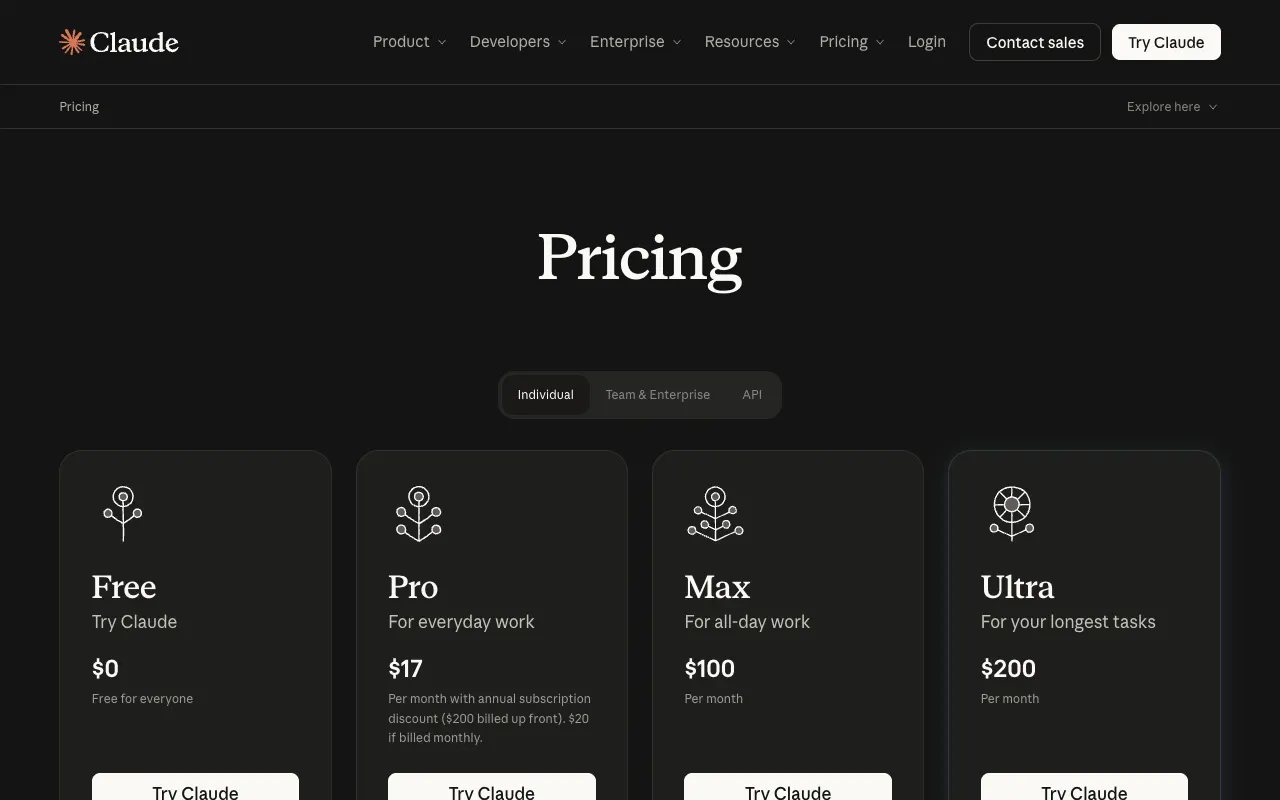
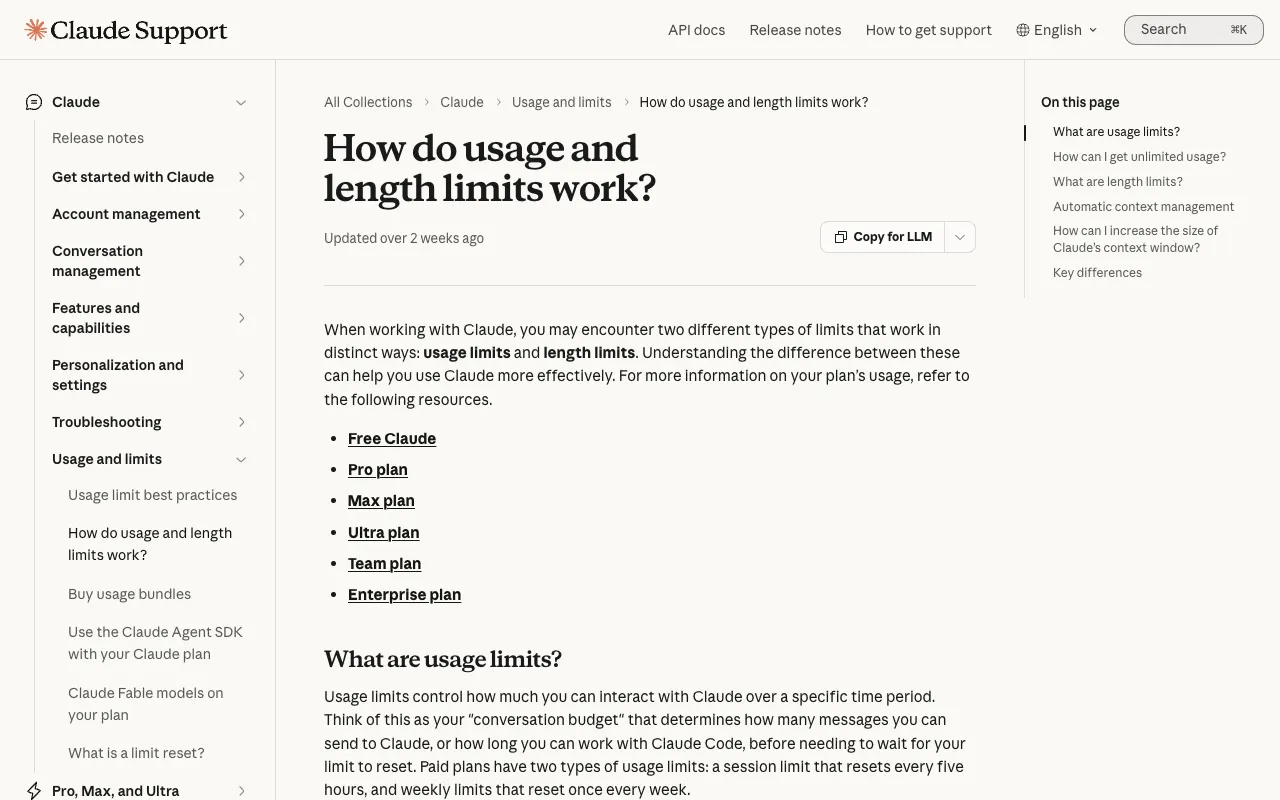
Anthropic says plans and prices can change, so check the page before you pay. Its help page says paid plans have a session limit that resets every five hours and weekly limits that reset once a week.
How do you get better answers from these prompts?
Fill in the brackets with real facts, and paste in your own material. Claude can only work with what you give it.
- Use real details. Your skills, your niche, your past work.
- Say who it is for. Name the reader or buyer.
- Ask for a format. A list, a table, an email under 120 words.
- Check and edit. Claude can be wrong.
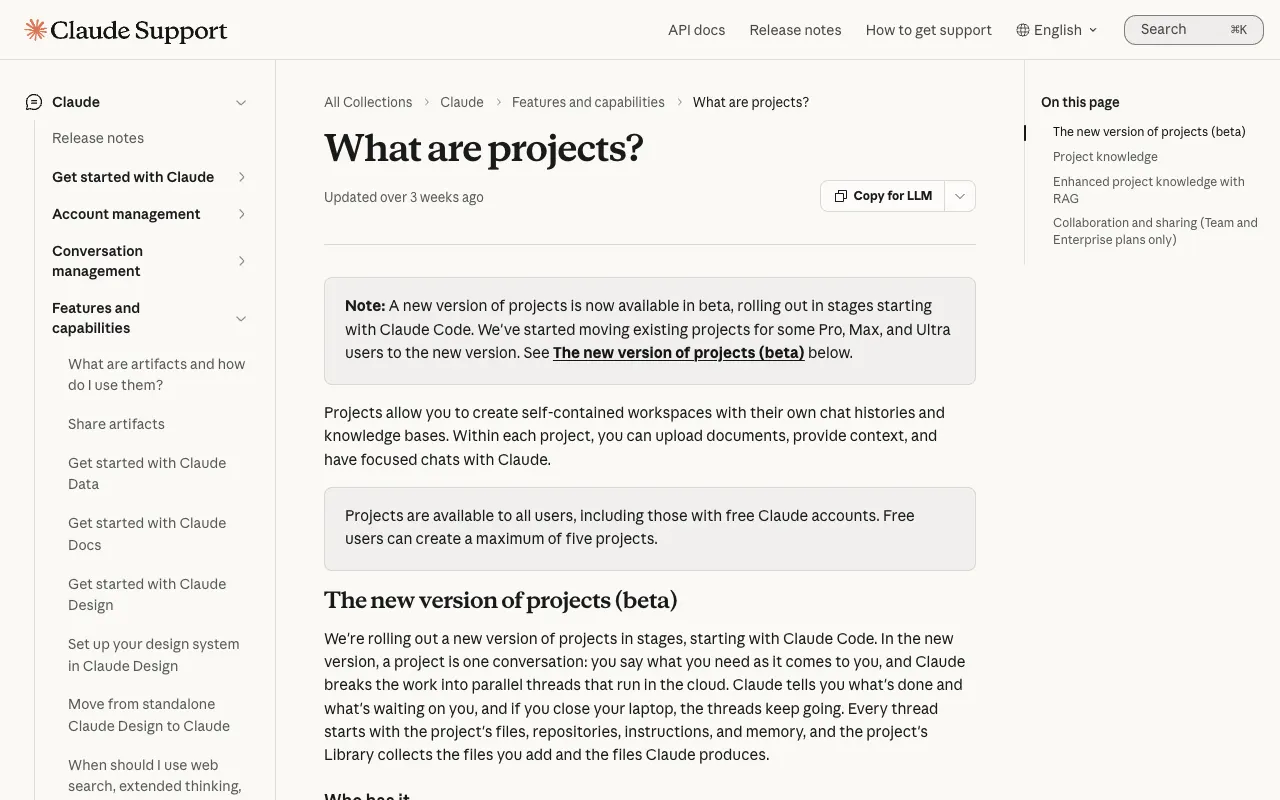
Anthropic's help page says Projects are workspaces with their own chat history and files, where you can upload documents and give context. Put your offer and your voice in a project once, so you do not paste them every time.
Which prompts help you make money with content?
These three help you plan, write and reuse posts. The money comes later, from sponsors, sales or clients.
Prompt 1: Pick a niche you can post about for a year
What it does: Turns your skills into a short list of topics.
```text I want to start posting online about [topic or skill]. I have [number] hours a week. My background: [2 or 3 lines about your job, hobbies and what friends ask you for help with].
Give me 5 niche ideas. For each one, write: 1. Who the audience is 2. The problem they pay to solve 3. 5 post ideas I could make this week 4. One way I could earn from it (sponsors, a product, services) Then tell me which one fits my background best and why. Keep it plain and short. ```
How to use it: Pick one niche and post on it for 30 days. Type each idea into the YouTube or Google search box. If nobody searches for it, drop it.
Prompt 2: Write a week of posts from one idea
What it does: Turns one idea into posts for different places.
```text Here is my idea: [idea in 2 or 3 sentences]. My audience is [who]. My voice is [for example: friendly, short sentences, no hype].
Write:
- 1 short video script, about 30 seconds, with a hook in the first line
- 1 LinkedIn post under 150 words
- 3 Instagram captions, each under 100 words
End each one with a simple call to action for [free guide, newsletter or product]. Do not make up facts or numbers. If you need a fact, leave a [CHECK] tag. ```
How to use it: Read each one out loud and change anything that does not sound like you. Replace every [CHECK] with a real fact. For video, see how to use Claude for YouTube. For the bigger picture, read how to make money with Claude.
Prompt 3: Turn a long video into clip ideas
What it does: Finds the best short moments in a transcript.
```text Below is a transcript of a long video. Find the 6 best moments to cut as clips of 20 to 60 seconds. For each clip give me: the exact first line, the exact last line, a one line reason a viewer would stay, and a title under 50 characters.
Transcript: [paste transcript with timestamps] ```
How to use it: Use the timestamps to cut the clips in your editor or a tool like OpusClip (affiliate link). To be paid for clips, read how to make money clipping videos, and check each brand's rules first.
Which prompts help you get freelance clients?
These three help you pick a service, write a pitch and price a job.
Prompt 4: Turn your skills into a service people buy
What it does: Builds a clear offer from what you already know.
```text My skills: [list]. My past jobs or projects: [list]. I can spend [hours] a week.
Suggest 4 services I could sell to small businesses. For each, write:
- A one sentence offer: "I help [who] get [result] by [what I do]"
- What the client gets, in 3 bullet points
- How long it takes me
- A price range to test, with how you got it
Tell me where my proof of past work is missing. ```
How to use it: Pick one service. Fix any missing proof with one small sample project. Treat the price as a guess, and check what others in your field charge.
Prompt 5: Write a pitch for one job post
What it does: Drafts a short, specific reply to a real request.
```text Here is a job post: [paste it]. Here is my background: [3 to 5 lines]. Write a reply under 130 words. Rules:
- First line shows I read the post, with one detail from it
- Say one thing I can do for them, in plain words
- Point to one real example of my work: [link or description]
- End with one easy question
- No filler like "I am excited"
```
How to use it: Check every claim is true, then send it yourself.
Prompt 6: Write a quote and a simple scope
What it does: Makes a one page quote so there are no surprises.
```text I will do this job for a client: [describe the job]. It takes me about [hours]. My rate is [amount] per hour or [amount] per project.
Write a one page quote with: what is included, what is not included, how many revisions, the timeline in steps, the price and when I get paid, and a line asking the client to reply "yes" to start. Keep it friendly and plain. No legal words I do not need. ```
How to use it: Send it as an email or a document. For anything large, ask a real person who knows contracts to read it. Claude is not a lawyer.
Example math: a 6 hour job at $40 an hour is 6 x 40 = $240. To reach $1,000 you would need about 5 of them (1,000 / 240 is 4.2). These are example numbers, not a promise.
Which prompts help you make a product?
These three help you plan something you build once and sell more than once, like a guide or a template pack.
Prompt 7: Find a problem worth a small product
What it does: Looks for a narrow problem a simple guide or file can solve.
```text I know a lot about [topic]. People often ask me: [list 3 to 5 real questions you get].
List 8 small products I could make in a weekend, like a checklist, a template pack or a short guide. For each:
- Who buys it
- The one problem it fixes
- What is inside, in 5 bullets
- A price to test, with a reason
Rank them from easiest to hardest to make. ```
How to use it: Pick the one people already ask you about. Before you build it, ask 5 people who match the buyer if they would pay. Real answers beat a good prompt.
Prompt 8: Outline and draft the product
What it does: Builds an outline, then helps you write each part.
```text I am making a [guide, template pack or short course] called "[working title]" for [buyer]. After they use it, they should be able to [result].
Step 1: Write an outline with 6 to 8 sections. Under each, list what the reader learns and one example I should add from my own work. Step 2: Wait for my edits. Then when I say "write section 1", draft it in a plain, friendly voice, about 300 words, with a short checklist at the end. ```
How to use it: Write the examples yourself. They make your product different from a generic one. The pricing page lists Claude Docs and file creation on every plan, so you can build the product right in Claude.
Prompt 9: Write the sales page and the first emails
What it does: Writes the words that explain your product and invite a buyer.
```text Product: [name]. Buyer: [who]. Price: [amount]. What is inside: [list]. The result a buyer can reasonably expect: [be honest, no guarantees].
Write a sales page: headline, the problem, what is inside, who it is for and not for, and 4 questions with answers. Then write 3 emails: welcome, a helpful tip and a reminder. Rules: no hype words, no income promises, no fake reviews, no fake countdowns. ```
How to use it: Use only real reviews. If you have none yet, leave that part out. Never say a buyer will earn a set amount.
Which prompts help with outreach?
These two help you find the right people and write a first message. Outreach is how most service and sponsor deals begin.
Prompt 10: Describe the people to contact
What it does: Describes your ideal customer so you can search for real ones.
```text I sell [service or product] to [type of customer]. Describe my ideal customer: job title, size of business, what they complain about, and where they spend time online. Then give me:
- 10 search phrases I can use on Google, LinkedIn or Instagram to find them
- 5 signs a business needs my help, things I can see from the outside
```
How to use it: Use the search phrases to build a list of 20 real people by hand from public pages. Claude does not find private contact details here, and you should not collect them.
Prompt 11: Write a first message that is short and real
What it does: Writes a short note that opens a conversation.
```text Write a first email to [name], who runs [business]. What I noticed about them: [one real detail from their site or post]. What I can help with: [one thing]. Rules: under 90 words, no fake flattery, no "I hope this finds you well," one clear question at the end, and an easy way to say no. Give me 3 versions with different openings. ```
How to use it: Make sure the detail is real, and say who you are. Follow the email rules where you and the person live, and ask an expert if you send at scale. A sending tool like Smartlead (affiliate link) handles the sending, but it does not fix a weak message. Send one follow up after a few days, then stop.
What is one prompt to run every week?
Prompt 12 is a review. It uses your own numbers to tell you what to do next.
Prompt 12: Weekly money review
What it does: Looks at your real week and picks one thing to fix.
```text Here is my week: [what I posted, pitched or built]. Here are my numbers: [views, replies, calls, sales, hours spent]. Tell me: 1. What worked best per hour of effort 2. What did not work, and one guess why 3. The one thing I should do more of next week 4. The one thing I should stop Be honest. If my numbers are too small to learn from, say so. ```
How to use it: Do the one thing. Small numbers are fine. The goal is to learn what to repeat.
What should you not do with these prompts?
Do not use them to fake things. No made up reviews, clients or results. No income promises. Check every number and name, because Claude can sound sure and be wrong. Do not paste private data you have no right to share. Follow each platform, brand and email rule.
What is the best way to start this week?
Run prompt 4 on Monday, prompt 5 on a real job post on Tuesday, and prompt 12 on Friday. That is three prompts and one real pitch.
If you want a walk through on screen, watch the free training. Start small and keep your own record of what works.
Sources
- Claude pricing, Anthropic (checked November 2026)
- How do usage and length limits work? Claude Help Center (checked November 2026)
- What are projects? Claude Help Center (checked November 2026)
FAQ
What is the best Claude prompt to make money?
There is no single best one. Start with the one that matches what you have: a skill (prompt 4), an audience (prompt 2) or people to contact (prompt 10). Test it on one real person or post.
Can I use these Claude prompts on the free plan?
Yes. Anthropic lists a free plan with limited usage every 5 hours and every week. Pro costs $17 a month billed yearly or $20 monthly.
How much money can I make with Claude prompts?
Nobody can say. Claude helps you draft and plan faster, but income depends on your offer, your skill and your customers.
Do I need to tell clients I used Claude?
Rules differ by client and platform, and I did not check them all. Read each client's and platform's terms, and be honest if asked. You are still responsible for the final work.
Is it safe to paste client work into Claude?
Be careful. Do not paste private data you have no right to share. Check Anthropic's privacy settings and your client's rules first.
Get the free training first
It's coming soon. Join the waitlist and you'll hear first.
No spam. Unsubscribe anytime.
Keep reading



Affiliate disclosure: some links in articles may be affiliate links. If you buy through one, Freed by AI may earn a commission. That does not change the price you pay.