How to use Claude for YouTube: 7 jobs it does well
You can use Claude for YouTube as a writing and planning partner. It helps you find video ideas, write titles, draft scripts, build outlines, write descriptions and chapters, and turn one video into many posts. It does not film anything or generate realistic video of people. For the video itself, you still need your own camera, a screen recording, or a tool like Claude Code that builds simple animated videos from code.
What can Claude do for a YouTube channel?
Claude is a text tool first. Most of its value is in the work before and after you hit record.
Here are the seven jobs this post covers:
- Finding video ideas
- Writing title options
- Drafting a script
- Building an outline
- Writing the description and chapters
- Repurposing one video into other posts
- Building simple videos with Claude Code
Claude writes the first draft. You make the final call, because it does not know your viewers the way you do.
Do you need a paid plan to use Claude for YouTube?
No. You can start on the free plan, and upgrade only if you hit the limits or want more tools.
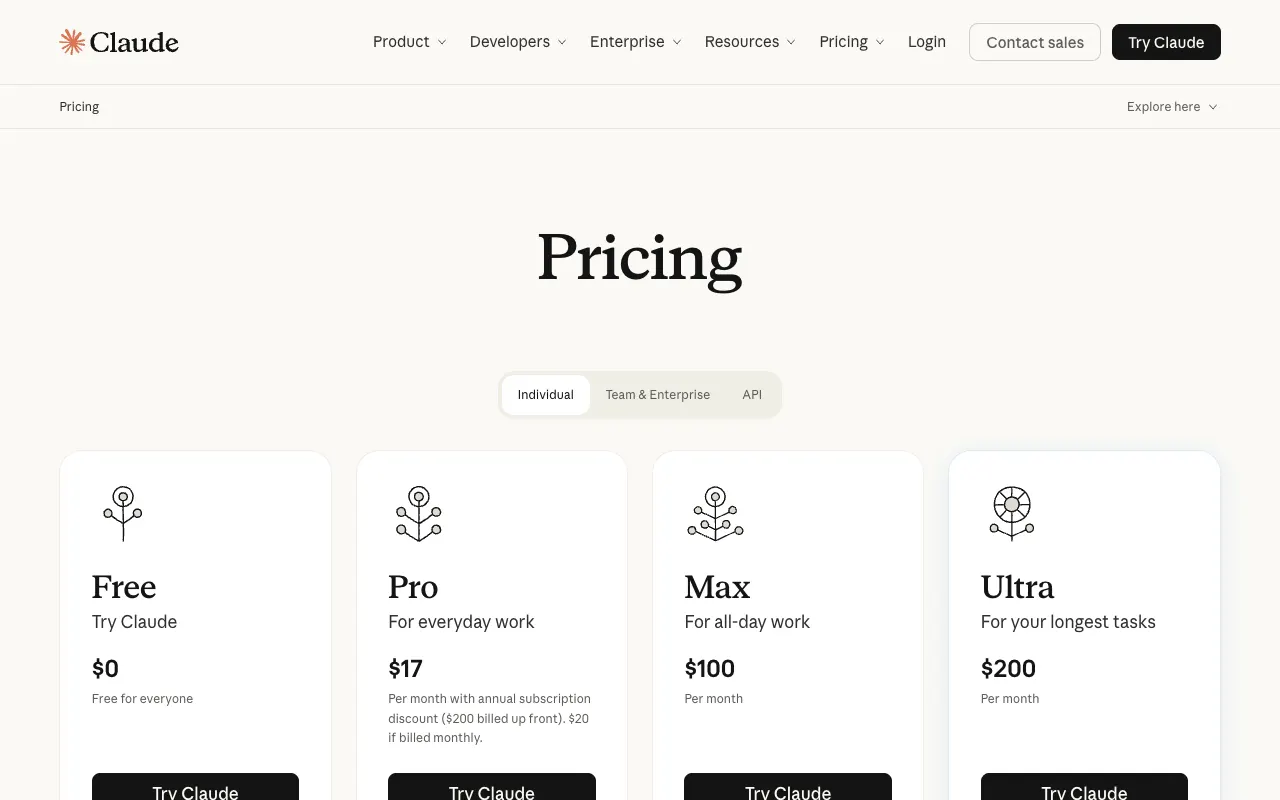
Anthropic's pricing page lists a Free plan at $0 with limited usage every 5 hours and every week. Pro costs $17 a month with the annual discount ($200 billed up front), or $20 if you pay monthly. Pro adds more usage, Projects and Claude Code. Max is $100 a month and Ultra is $200 a month, and both are for people who use Claude all day. Prices and plans can change, so check the page before you pay.
A good first test: use the free plan for a week on one channel. If you keep running out of messages, that is your sign to try Pro.
How do you find YouTube video ideas with Claude?
Give Claude your niche, your viewer and what you already posted, then ask for ideas in a list. Claude does not see live search data or your analytics on its own, so you bring the facts.
Try this flow:
- Tell Claude who the channel is for and what problem each video solves.
- Paste your last 10 video titles so it does not repeat them.
- Ask for 20 ideas, each with the viewer's problem in one line.
- Pick three and check them against real search. Type each idea into YouTube search and see what autocomplete suggests.
That last step matters. Claude can guess what people want, but YouTube's own search box shows what people really type. Use Claude to widen the list, and use real search to pick from it.
How do you write better YouTube titles with Claude?
Ask for many options, then pick one and test it against your own judgment. A title should say what the video is about in plain words.
Ask Claude for 10 titles for one idea, in different styles: a question, a "how to", a number list and a short plain one. Then ask it to say which promise each title makes. A title that promises more than the video delivers will lose viewers fast.
Keep the main search phrase near the start of the title. Cut any word that does not help the viewer. Never let Claude add a claim that is not true, like "in 5 minutes" when the video is 20.
Can Claude write a YouTube script?
Yes, Claude can write a full first draft. It works best when you give it your own notes and voice, not just a topic.
Here is a simple way to do it:
- Paste your rough notes, or talk out the idea and paste the transcript.
- Say the length you want, who is watching, and what you want them to do at the end.
- Ask for a hook in the first two sentences, then the main points, then a short ending.
- Read it out loud. Change every line that does not sound like you.
Anthropic's help pages say you can add documents to Projects, which are workspaces with their own chats and files. You can add a past script or two and write instructions like "short sentences, friendly tone, no hype." Claude then follows that style in every chat in that project. Free accounts can make up to five projects.
Do not post a script exactly as Claude wrote it. Add your own story, your own examples and your own opinion.
How do you build a video outline with Claude?
Ask for an outline before you ask for a script. A good outline shows the order of your points and where the viewer might get bored.
Give Claude the idea and ask for sections, with one line on what each section proves. Then ask: "Which part is the weakest? Which part could I cut?" Cutting a weak part usually helps more than adding a new one.
You can also use the outline as your recording guide. You can also talk from the bullet points and skip the full script. That often sounds more natural.
How do you write YouTube descriptions and chapters with Claude?
Paste your transcript or script and ask Claude to write the description and a chapter list. This is tedious work, and it suits Claude.
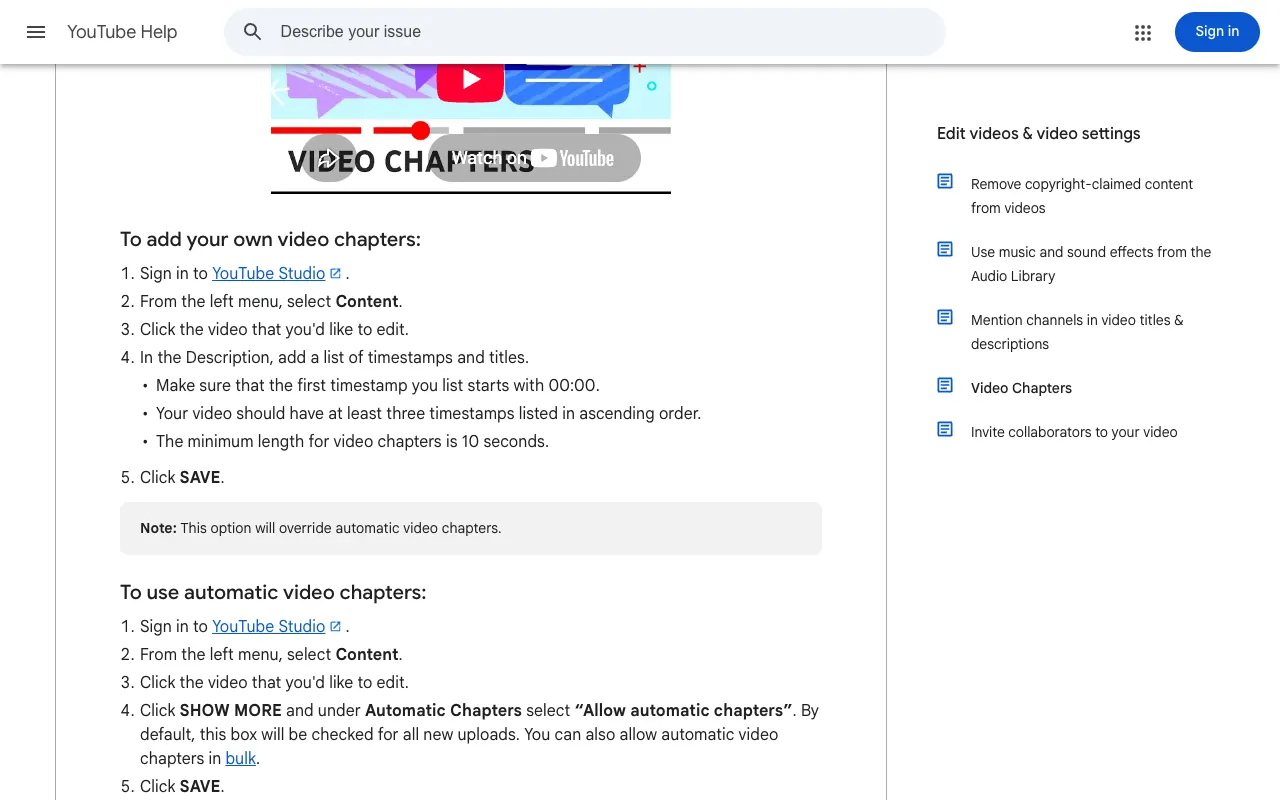
YouTube's help page says the first few lines of a description are what viewers see first, so put the summary there. For chapters, YouTube lists these rules: the first timestamp must start at 00:00, you need at least three timestamps in ascending order, and each chapter must be at least 10 seconds long. Tell Claude these rules in your prompt so the list comes out right.
Claude cannot know your real timestamps unless you give them. Paste a transcript with times, or fill in the times yourself after Claude writes the chapter names. Always check them against the video.
How do you repurpose a YouTube video with Claude?
Paste the transcript and ask Claude to turn it into other formats. One video can become a few posts without much extra work.
- A short written post for LinkedIn or X
- A list of 5 clip ideas, each with a start and end line from the transcript
- A newsletter paragraph
- A blog post outline, like the one you are reading
For the clips themselves, Claude only picks the moments. A clipping tool does the cutting. You can read how that works in how AI video clipping works. Tools like OpusClip (affiliate link) cut long videos into short clips. I may earn a commission if you sign up through that link.
If you want to turn clips into income, read how faceless channels make money. Results vary, and nobody can promise views or earnings.
Can Claude make the video itself?
Not realistic video. Claude does not generate footage of people, places or scenes. Anthropic says its own Claude Motion feature does not use a video generation model, so it does not create realistic footage or people.
What it can do is help you build videos from code. Claude Code runs in your terminal, in some code editors, in a desktop app and in the browser, and it can write and run code for you. With the right tools, it can render videos made of text, captions, charts and simple animation. That is a good fit for faceless explainers. I explain the full setup in how to make videos with Claude.
For a voiceover, you can use a voice tool such as ElevenLabs (affiliate link). If you want realistic AI footage, you need a video model. See can you make AI videos with ChatGPT for how that works with a plugin, and how to make faceless AI videos for the whole process.
Do you have to tell YouTube when you use Claude?
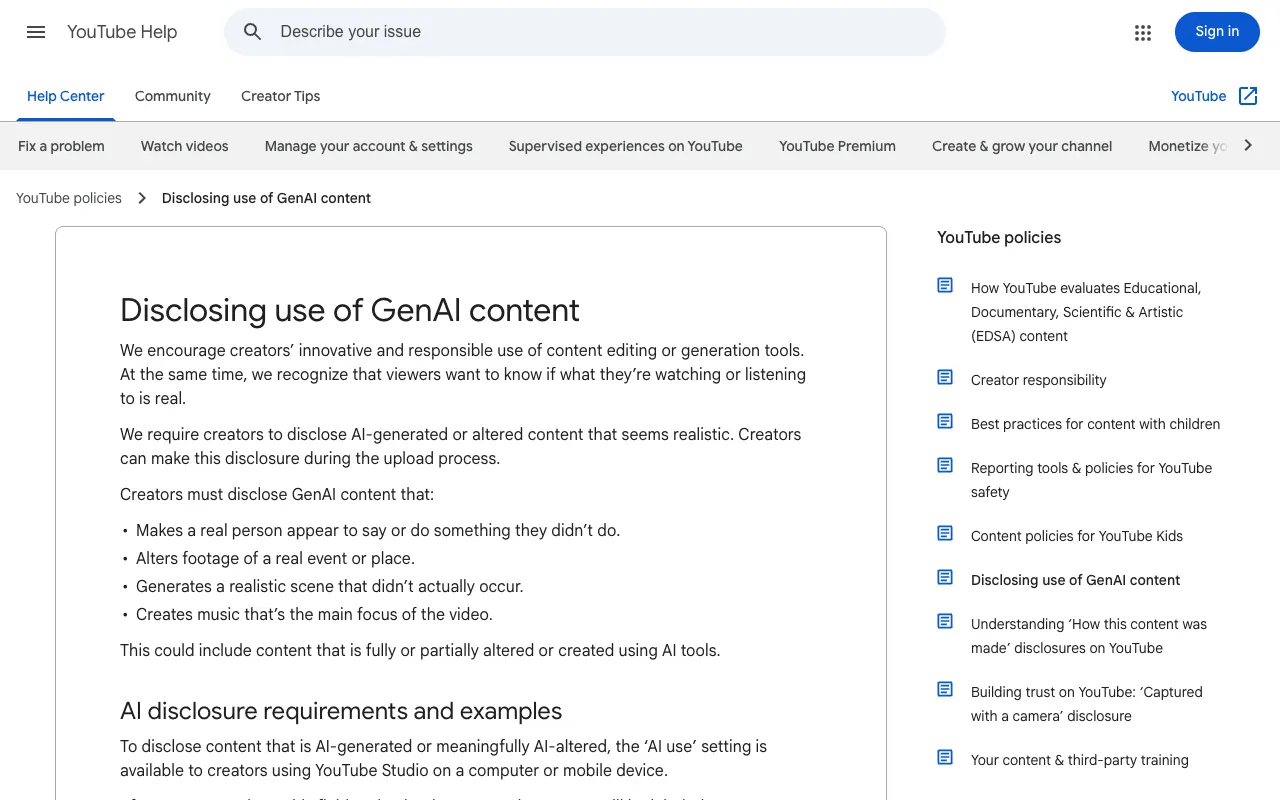
Not for most writing help. YouTube asks you to disclose realistic content that is made or changed with AI, but not for production help.
YouTube's rules say you must disclose content that makes a real person seem to say or do something they did not do, changes footage of a real event or place, or creates a realistic scene that did not happen. They list using AI to improve a script, title, thumbnail or outline, caption creation, idea generation and cloning your own voice for voiceovers as things you do not need to disclose. The list is not complete, so read the page yourself and check it again when you upload.
Copy and paste prompts to start with
Change the words in brackets, then paste these into Claude.
- "I run a YouTube channel about [topic] for [viewer]. Here are my last 10 titles: [list]. Give me 20 new video ideas. For each, write the viewer's problem in one line."
- "Write 10 title options for a video about [idea]. Mix a question, a how-to, a number list and a short plain one. Under each, say what it promises."
- "Here are my notes: [notes]. Write a [length] script for [viewer]. Start with a hook in two sentences. Use short, plain words. End by telling them to [action]."
- "Make an outline for a video about [idea] with [number] sections. For each section, give one line on what it proves. Then tell me the weakest section."
- "Here is my transcript with timestamps: [transcript]. Write a description with a two line summary first. Then write chapters. The first must be 00:00, there must be at least three, and each must be at least 10 seconds."
- "Here is my transcript: [transcript]. Give me 5 clip ideas with the exact opening line of each, and a short LinkedIn post."
What are the limits of using Claude for YouTube?
Claude helps you think and write. It also has limits.
- It cannot film, edit or generate realistic video of people.
- It can be wrong. Check every fact, number and name before you publish.
- It does not know your analytics unless you paste them in.
- It writes in a general voice. Your stories and opinions are what make a channel stand out.
- No tool can promise views, subscribers or income. Results vary.
Try it on one video this week. If you want to see the whole process on screen, watch the free training.
Sources
- Claude pricing, Anthropic (checked November 2026)
- What are projects? Claude Help Center (checked November 2026)
- Claude Code overview, Anthropic docs (checked November 2026)
- Get started with Claude Motion, Claude Help Center (checked November 2026)
- Video Chapters, YouTube Help (checked November 2026)
- Tips for video descriptions, YouTube Help (checked November 2026)
- Disclosing use of GenAI content, YouTube Help (checked November 2026)
FAQ
Can Claude make YouTube videos?
Not realistic ones. Claude can write scripts, titles and descriptions, and with Claude Code it can build simple videos from code, like captions, charts and animated explainers.
Is Claude free to use for YouTube?
Yes, to start. Anthropic lists a free plan with limited usage every 5 hours and every week. Paid plans start with Pro at $17 a month billed yearly or $20 monthly, and they add Projects and Claude Code.
Can Claude write my YouTube script?
Yes. Give it your notes, your viewer and the length you want, then rewrite the draft in your own voice. Do not post it without adding your own stories and checking the facts.
Can Claude find keywords or check my YouTube analytics?
Not by itself. Claude does not see live search data or your channel stats unless you paste them in. Use YouTube search suggestions and YouTube Studio for real data, and use Claude to make sense of it.
Do I have to disclose AI use on YouTube if I use Claude?
Usually not for scripts, titles, outlines or ideas. YouTube says production help like that does not need a disclosure. You must disclose realistic content that is made or changed with AI, such as a real person seeming to say something they did not.
Is it better to use Claude or ChatGPT for YouTube?
Both can help with writing. Pick the one whose answers sound more like you and fit your budget. See can you make AI videos with ChatGPT for what ChatGPT can and cannot do with video.
Get the free training first
It's coming soon. Join the waitlist and you'll hear first.
No spam. Unsubscribe anytime.
Keep reading
Affiliate disclosure: some links in articles may be affiliate links. If you buy through one, Freed by AI may earn a commission. That does not change the price you pay.