Faceless AI videos: how to make them step by step
Faceless AI videos are videos where no real person shows their face. You write a script, turn it into a voice with AI, add visuals like stock clips, animation or screen recordings, then post the video. You can make one with a phone or laptop, and some of the tools below have free plans.
What are faceless AI videos?
A faceless AI video is a video that gets its message across without the creator on camera. AI helps with one or more parts of the work, like the script, the voice, the visuals or the captions.
People also search for "no face AI videos" and "faceless AI video maker". They mean the same thing. A faceless AI video maker is any tool, or mix of tools, that helps you build this kind of video.
What kinds of faceless videos can you make?
There are five common kinds. Pick the one that fits your topic.
- Voiceover with b-roll. You hear a voice while stock or AI clips play. This is the easiest place to start.
- AI avatar. A digital presenter talks on screen. It is not a real person, but viewers still see a face. Some people count this as faceless and some do not.
- Animation. Drawings, characters or motion graphics tell the story.
- Screen recording. You show a tool or website while a voice explains it.
- Text on screen. Words appear in big type, with music or a voice.
You can mix them. Many videos use a voiceover, b-roll and text together.
How do you make a faceless AI video step by step?
You can make one in seven steps.
- Pick one idea. Choose one question your viewer wants answered, like "How do I do X?"
- Write the script with ChatGPT or Claude. Ask for a short script with a hook in the first line. Read it out loud. Cut any line that sounds stiff. For more on this, see can you make AI videos with ChatGPT and how to make videos with Claude.
- Make the voice. Use an AI voice tool, or record your own voice. A real voice with no face is still a faceless video.
- Add visuals. Match a clip, image or screen recording to each line of the script.
- Add captions. Captions help people who watch with the sound off. Keep them short and easy to read.
- Edit. Trim any pause. Add music at a low volume. Check that the first three seconds make people want to stay.
- Post. Upload to YouTube, TikTok or Instagram. Add the AI label if the platform asks for it (see the rules below).
If you want to see the whole process on screen, watch the free training. It shows how Othman Tmoulik makes AI videos without showing his face, using ChatGPT or Claude.
Which faceless AI video tools are free, and which cost money?
Plans change often, so check each pricing page before you pay. Here is what each official page showed on November 19, 2026.
- CapCut. CapCut's own guide calls its Standard plan "commonly referred to as the free version." It includes cutting, trimming, text, captions and stickers. Pro is paid, and CapCut says prices can vary by region.
- Canva. Canva says Canva Free is available to anyone. It has limited AI access. Canva Pro and Business add more AI.
- ElevenLabs (affiliate link), for voice. The Free plan is $0 per month with 10k credits per month. The commercial license is listed on the first paid plan, not on Free. Read the license terms before you post for money.
- HeyGen (AI avatar). The Free plan gives 3 videos per month with a watermark, each up to 1 minute. The Creator plan is $29 per month.
- Pexels (stock clips). All photos and videos can be downloaded and used for free. Credit is not required. You may not sell unchanged copies.
A free setup can look like this: ChatGPT or Claude for the script, a voice from the free ElevenLabs plan, Pexels clips, and CapCut for the edit. Free plans have limits, so expect to hit them if you post a lot.
What are the platform rules for AI videos?
YouTube and TikTok both ask you to label AI content that looks real. Rules change, so read the pages in Sources.
What does YouTube require for faceless AI videos on YouTube?
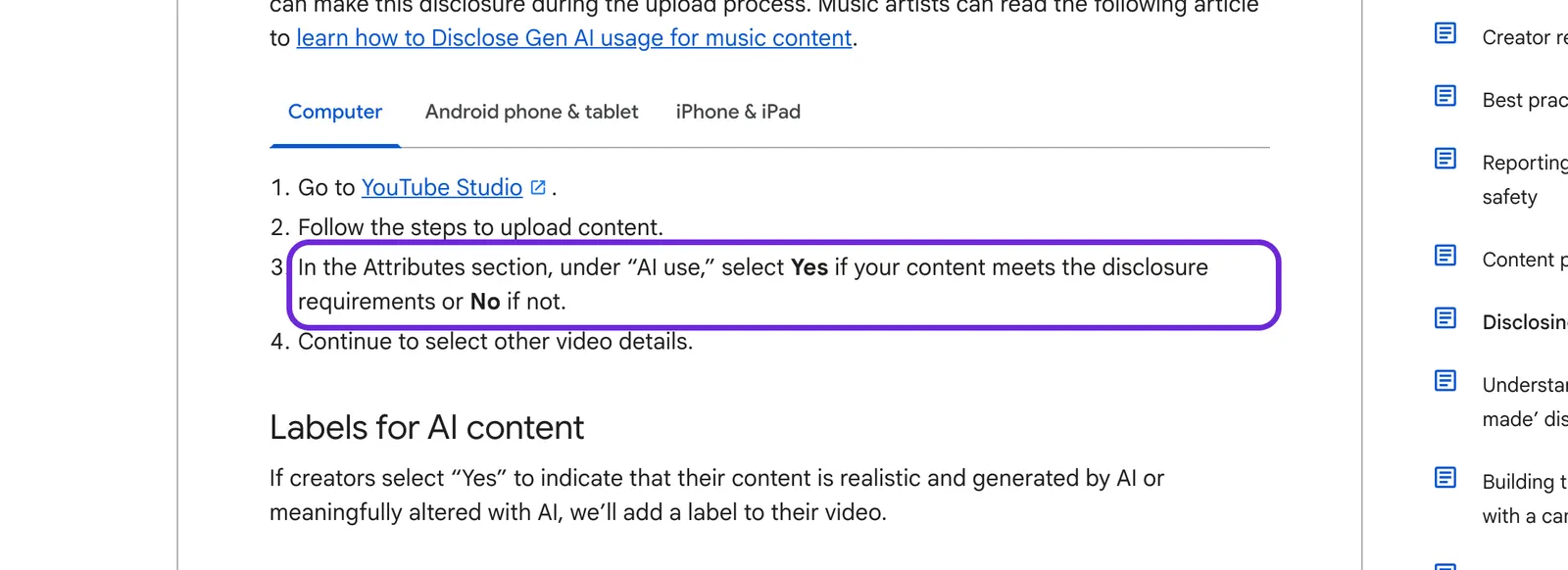
YouTube requires you to disclose AI-generated or altered content that seems realistic. You do this in YouTube Studio, in the Attributes section, under "AI use." YouTube says you must disclose content that:
- Makes a real person appear to say or do something they did not do.
- Alters footage of a real event or place.
- Generates a realistic scene that did not happen.
- Creates music that is the main focus of the video.
You do not need to disclose content that is not realistic, or minor edits. YouTube's list of examples that need no disclosure includes using AI to help with a script, a title or captions, voice repair, and cloning your own voice for voiceovers. YouTube also says that disclosing AI content alone will not limit a video's audience or its eligibility to earn money. YouTube may add a label on its own, and creators who keep skipping disclosure can face penalties.
What does TikTok require for faceless AI videos on TikTok?
TikTok asks you to label content that is fully AI-generated or significantly edited by AI. It also requires a label on all AI-generated content with realistic images, audio or video. You can turn on the "AI-generated content" setting in the post settings, or add text, a hashtag sticker or a note in the description. The label reads "creator labeled as AI-generated."
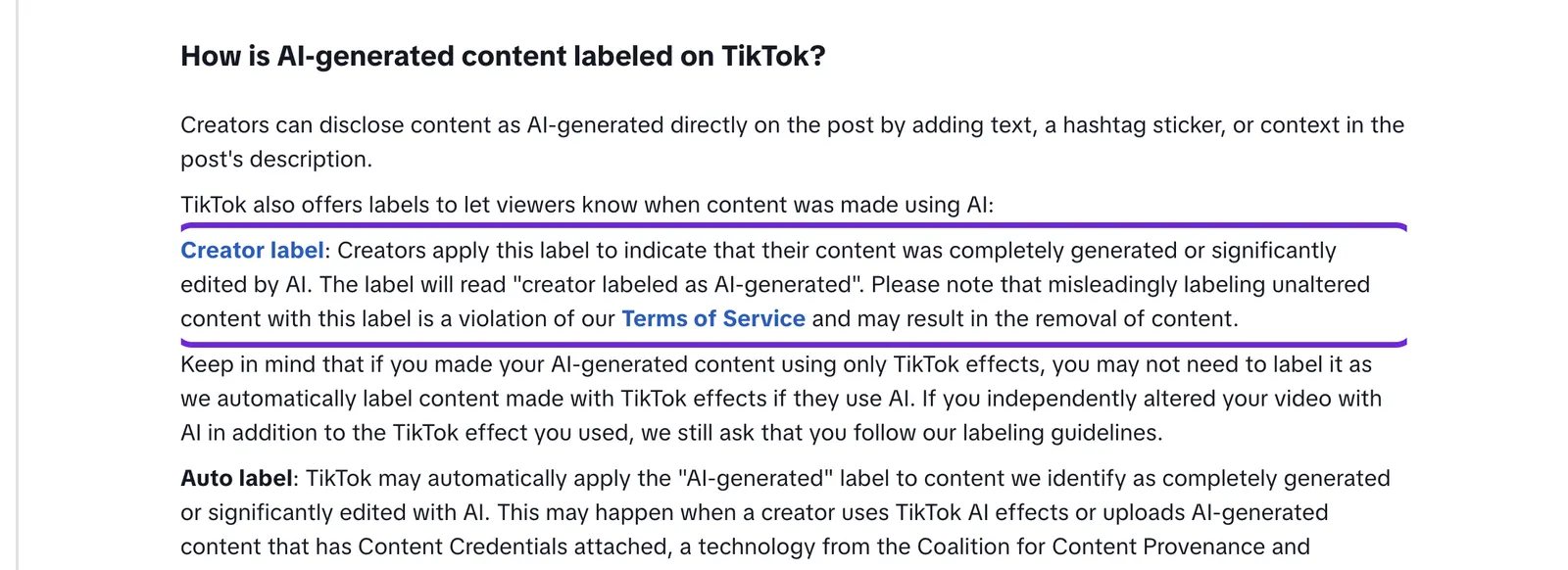
TikTok may add an "AI-generated" label by itself, and an automatic label cannot be removed. TikTok does not allow AI content that shows fake crisis events, or the likeness of people under 18, or private adults used without permission.
Can you make money with faceless AI videos?
Nobody can promise you a number, and results vary a lot. If you want to test your own math, use the earnings calculator and enter your own rates. It does not predict what you will earn.
Sources
- YouTube Help: Disclosing use of GenAI content (checked November 2026)
- TikTok Support: About AI-generated content (checked November 2026)
- CapCut: Standard vs Pro (checked November 2026)
- Canva pricing (checked November 2026)
- ElevenLabs pricing (checked November 2026)
- HeyGen pricing (checked November 2026)
- Pexels license (checked November 2026)
FAQ
What are faceless AI videos?
Faceless AI videos are videos with no real person on camera. AI helps make the script, voice, visuals or captions, and the video is posted like any other.
Are there free tools for faceless AI videos?
Yes. CapCut has a free Standard plan, Canva has a free plan with limited AI, ElevenLabs has a Free plan with 10k credits per month, HeyGen has a free plan with watermarked videos, and Pexels clips are free to use. Limits apply, so check each pricing page.
What is the best faceless AI video maker?
It depends on the kind of video. For voiceover with b-roll, an editor like CapCut is enough. For a digital presenter, a tool like HeyGen fits. Start with the free plan of one tool before you pay for anything.
Can I post faceless AI videos on YouTube?
Yes. You must disclose AI content that looks realistic by choosing "Yes" under "AI use" in YouTube Studio. YouTube says disclosure alone does not limit your audience or your ability to earn money.
Do I have to label faceless AI videos on TikTok?
TikTok requires a label on AI-generated content with realistic images, audio or video. You can use the AI-generated content setting before you post, or add text or a hashtag sticker. TikTok may also add a label on its own.
Can I make faceless videos without any editing skills?
Yes. Tools like CapCut add captions for you, and ChatGPT or Claude can write the script. The free training shows the full method for beginners.
Get the free training first
It's coming soon. Join the waitlist and you'll hear first.
No spam. Unsubscribe anytime.
Keep reading
Affiliate disclosure: some links in articles may be affiliate links. If you buy through one, Freed by AI may earn a commission. That does not change the price you pay.