Best AI clipping software: 5 tools compared (2026)
The best AI clipping software depends on how much video you cut and where you post it. For most people who clip a few videos a month, OpusClip (affiliate link) has a free plan and paid plans from $12 a month. Klap (affiliate link) charges by the clip, from $14.50 a month on a yearly plan. Vizard, 2short.ai and Munch Studio fit other needs. This post compares all five, using their own pricing pages.
One thing to say up front. We read the pricing pages. We did not run the same video through every tool, so we do not rank them on clip quality. We rank on price, limits and fit, which you can check yourself. Othman Tmoulik has affiliate links for OpusClip and Klap. He has none for the other three.
If you are new to the idea, read how AI video clipping works first. If you want to know how clips turn into money, read how to make money clipping videos.
What is AI clipping software?
AI clipping software takes one long video and cuts it into short clips for TikTok, Instagram Reels and YouTube Shorts. It picks the moments, crops to vertical, and adds captions.
You give it a podcast, a stream, a talk or a YouTube link. The tool reads the words in the video. It guesses which parts could stand alone as a short clip. Then it makes each clip tall, adds moving captions, and lets you edit before you export.
The tool only guesses what your audience likes, so you still watch each clip before you post it. A clip can start mid-thought or end too soon.
How do the five tools compare?
Here is the short version, from each tool's pricing page, checked November 2026. All prices are in US dollars.
| Tool | Free plan | Cheapest paid plan | What you pay for |
|---|---|---|---|
| OpusClip | Yes, $0, with watermark on captions | Starter, $12 a month | Plan level and features |
| Klap | Free try on 1 video, no download | Basic, $29 a month, or $14.50 a month billed yearly | Clips per month |
| Vizard | Yes, 60 credits a month | Creator, $29 a month, or $14.50 a month billed yearly | Credits |
| 2short.ai | Yes, minutes of AI analysis | Lite, $9.90 a month | Hours of video analyzed |
| Munch Studio | No, 7 day free trial | Essential, $68 a month, or $38 a month billed yearly | Minutes of video repurposing |
Prices change, so check the page before you pay.
Which AI clipper is best for a free start?
OpusClip, Vizard and 2short.ai all have a real free plan. Klap lets you try one video. Munch Studio has a 7 day trial instead.
The free plans are not equal:
- OpusClip Free: animated captions come with a watermark, and watermark-free export is listed as a paid feature.
- Vizard Free: 60 credits a month, 720p exports, and a 3 day video storage limit. The Free card does not say whether exports carry a watermark. The Creator plan is the one that says "no watermark."
- 2short.ai Starter: a monthly limit on minutes of video the AI looks at. The page says 30 minutes in the pricing box and 15 minutes in one other spot. We could not tell which is current, so check before you plan around it.
- Klap: one free video, no credit card. You can preview and edit the clips, but downloading and posting needs a paid plan.
Any of these will show you what AI clipping feels like. If you want to post clips every week, the free limits run out fast.
What does OpusClip cost and who is it for?
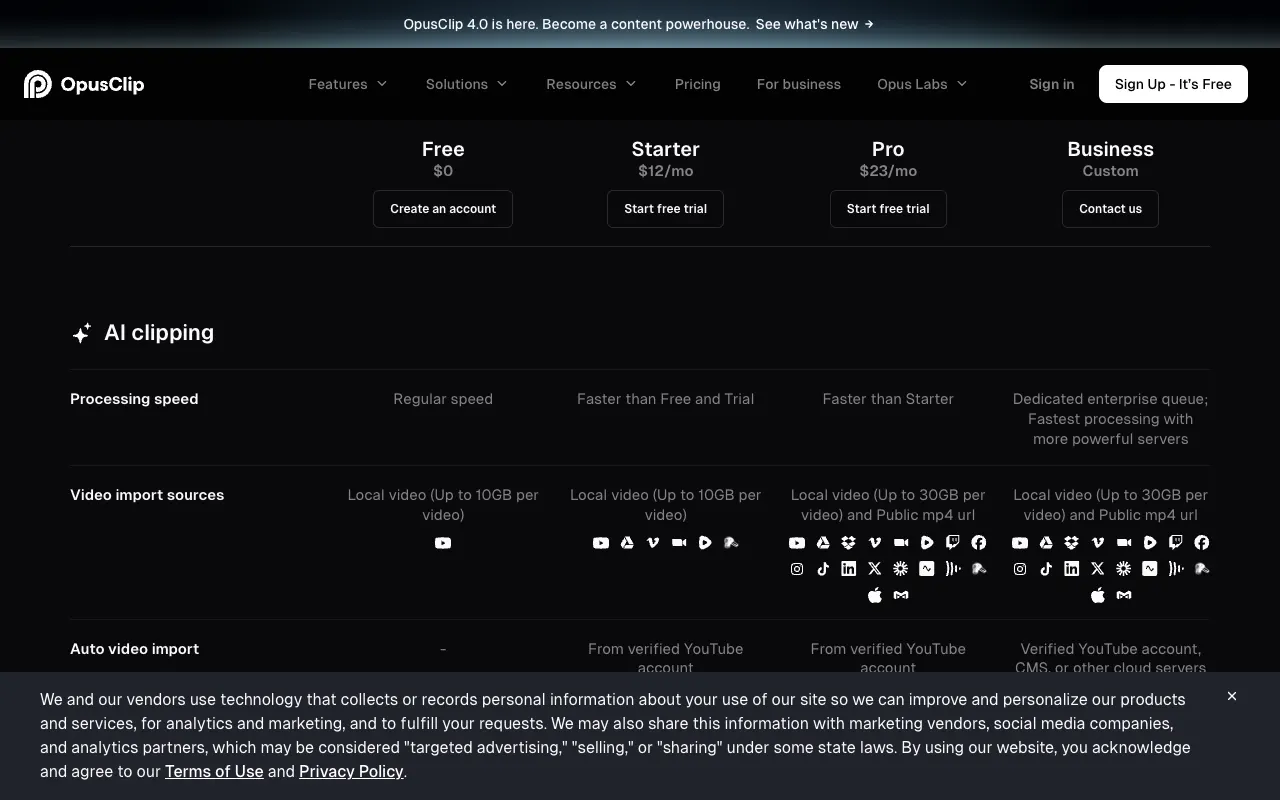
OpusClip lists four plans: Free at $0, Starter at $12 a month, Pro at $23 a month, and Business with custom pricing. It fits people who want a full toolkit around the clipping and a low entry price.
Its pricing page, checked November 2026, shows the plans in one long comparison table.
What changes as you go up the plans, from the table:
- Processing speed. Free is regular speed. Starter is faster than Free. Pro is faster than Starter.
- Import size. Free and Starter take local video up to 10GB. Pro takes up to 30GB and also a public mp4 link.
- Shapes. Free and Starter export 9:16. Pro also lists 1:1 and 16:9.
- Storage. On Starter, the page says media storage expires after 29 days. Pro lists 100GB of fixed storage.
- Brand look. Starter lists 1 brand template. Pro lists up to 4.
- Extras. Pro lists a social media scheduler, analytics and an MCP connector.
The page text we read does not show how many clips or minutes each plan includes. If that matters to you, check the plan details in the app before you pay.
Who it fits: creators who want one place to clip, caption, brand and schedule. It also fits people who want to start free, and then step up to $12 or $23 when they hit the limits.
What does Klap cost and who is it for?
Klap sells clips by the month. Basic is 100 clips for $29 a month, Pro is 300 clips for $79, and Pro+ is 1,000 clips for $189. Pay for a year and each price is cut in half.
Klap's page says it plainly: "Only pay for clips you generate." You pay for how many clips you make, not for the length of the source video. A source video can run up to 3 hours.
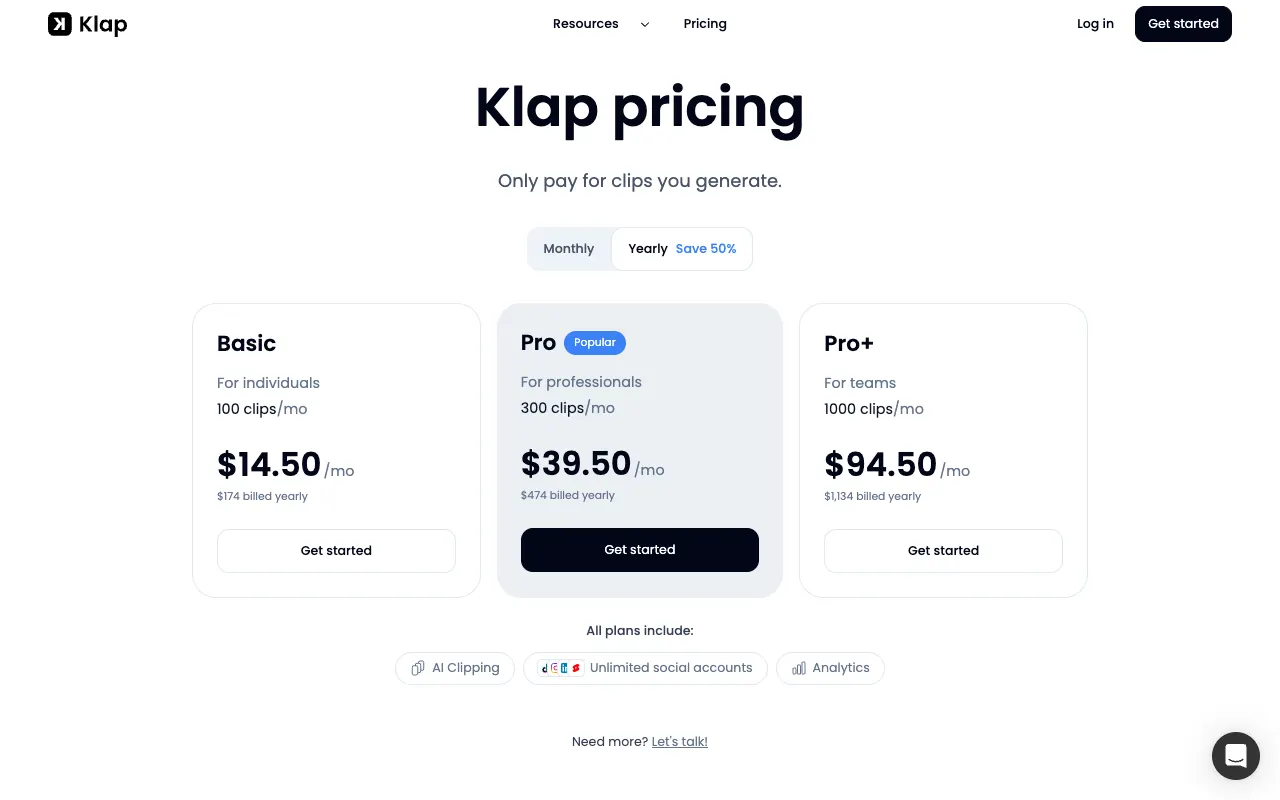
Here is the math for the price of one clip. This is our own division of the prices on the page. It assumes you use every clip in the plan, which most people do not.
| Plan | Clips a month | Billed monthly | Per clip | Billed yearly | Per clip |
|---|---|---|---|---|---|
| Basic | 100 | $29 | $0.29 | $14.50 a month | about $0.15 |
| Pro | 300 | $79 | about $0.26 | $39.50 a month | about $0.13 |
| Pro+ | 1,000 | $189 | about $0.19 | $94.50 a month | about $0.09 |
Every Klap plan includes the same features, per the page's FAQ: a virality score, reframing that follows the active speaker, animated captions, 99+ languages, scheduling and publishing to TikTok, YouTube, Instagram, LinkedIn and Facebook, unlimited social accounts, analytics, and an editor with b-roll and hook titles. Paid exports have no Klap branding.
So with Klap, the only choice is how many clips you need. That is easy to understand. It also means a plan with unused clips is wasted money.
Who it fits: people who want simple pricing, a long source video, and posting to many platforms from one tool. It also fits LinkedIn creators, since LinkedIn is on the publishing list.
What does Vizard cost and who is it for?
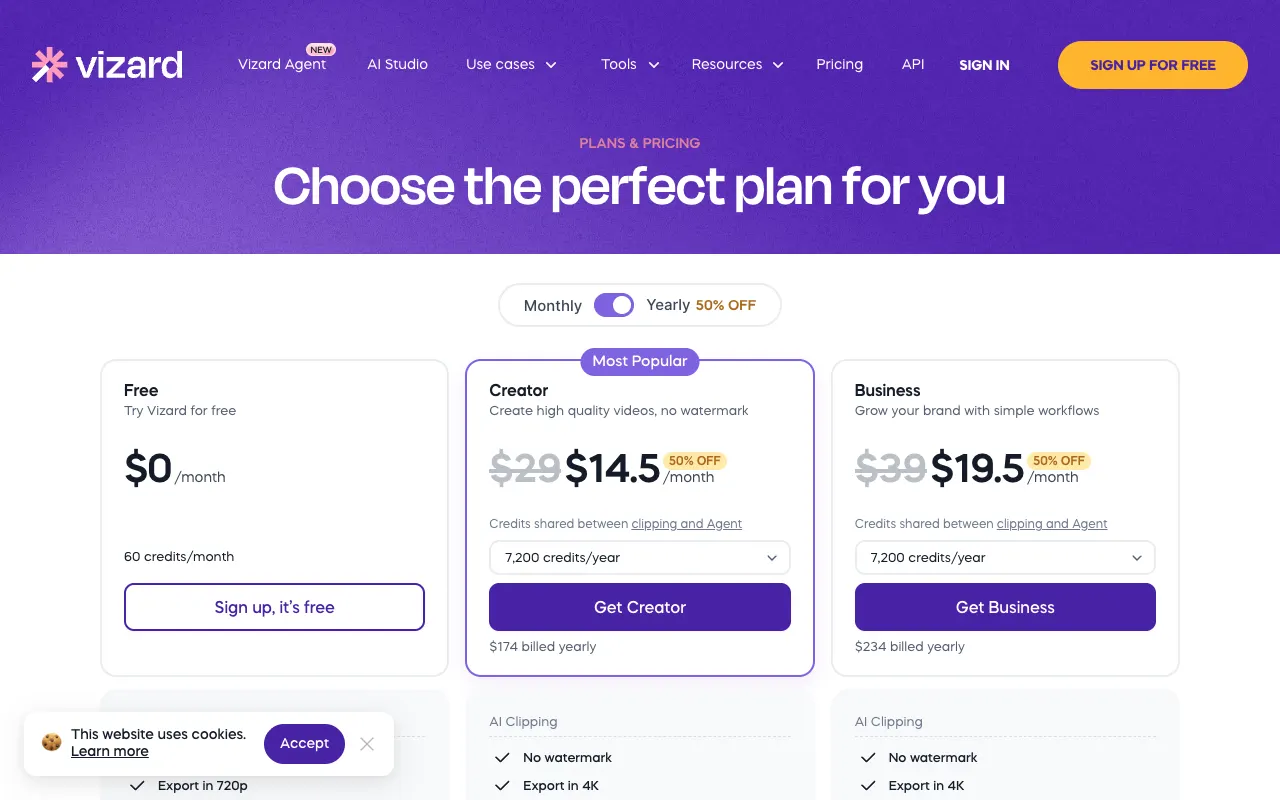
Vizard has a Free plan with 60 credits a month, a Creator plan at $29 a month ($14.50 a month billed yearly), and a Business plan at $39 a month ($19.50 a month billed yearly). It fits people who want a free plan with a full editor.
Vizard's page shows a switch for Monthly and Yearly, with 50% off for yearly. The screenshot below has the Yearly view on, so it shows the lower prices with the monthly price crossed out.
From the page:
- Credits. Credits are shared between clipping and Vizard's Agent tool. The paid plans list from 600 to 6,200 credits a month, depending on the credit tier you pick. Unused credits roll over for 2 months.
- Free plan limits. Uploads up to 60 minutes and 1GB. Exports up to 10 minutes, in 720p.
- Creator plan. No watermark, 4K export, scheduling of social posts, 6 social accounts, and 100GB of storage. Uploads up to 10 hours and 30GB.
- Business plan. Everything in Creator, plus team members at $5 a month per seat, shared projects, a brand kit with custom fonts, 20 social accounts, and unlimited storage.
The page does not tell us how many credits one clip uses. We did not find that number on the pricing page. If you plan a lot of clips, ask or test with the free credits first.
Who it fits: people who like to edit in a full editor, and who want a free way to test it. The credit system needs a little more thought than Klap's clip count.
What does 2short.ai cost and who is it for?
2short.ai is the cheapest paid option here. Lite is $9.90 a month, Pro is $19.90, and Premium is $49.90. The plans mainly differ in how many hours of video the AI can analyze.
Its page says every plan gets every feature. You pay for more analysis time, not for more features.
| Plan | Price | AI video analysis | Exports |
|---|---|---|---|
| Starter | Free | 30 minutes a month, per the pricing box | View and export clips already made |
| Lite | $9.90 a month | 5 hours a month | 60 minutes of fast server-side exports |
| Pro | $19.90 a month | 15 hours a month | Unlimited fast server-side exports |
| Premium | $49.90 a month | 50 hours a month | Unlimited, plus priority support and beta features |
The page lists face tracking that keeps the speaker centered, one-click animated subtitles, unlimited 1080p exports with no watermark, vertical, square and horizontal shapes, and brand presets for logos and overlays.
Two limits to know. First, the FAQ says to start by pasting a YouTube link, and that it can only process videos with captions. YouTube makes captions for most videos. Lite and up also import from Google Drive and public links. Second, the FAQ lists the languages it supports, and the list is long but not the same as Klap's 99+.
Here is a quick "if" for your own planning. If you post a 1 hour podcast each week, that is about 4 hours a month. That fits inside Lite's 5 hours. Your own numbers will differ.
Who it fits: YouTubers who start from a YouTube link or a Drive file, want the lowest paid price, and clip a few long videos a month.
What does Munch Studio cost and who is it for?
Munch Studio is more than a clipper. It also makes scripts, posters, carousels and a content plan. Essential is $68 a month, or $38 a month billed yearly. Premium is $85 a month, or $60 a month billed yearly.
We include it because it lists video repurposing as a core part of its plans. But its page also says it plans and makes content for a brand, so clipping is one part of it. It does not have a free plan. Every plan starts with a 7 day free trial.
From the pricing page:
- Essential. 500 minutes of video repurposing a month, 5 video scripts a week, 10 generated videos a month, 100GB storage, and 1 team member (the owner).
- Premium. 1,000 minutes of video repurposing a month, unlimited video scripts, 30 generated videos a month, 1TB storage, and unlimited team members.
- Every plan. Publishing to Instagram, Facebook, LinkedIn, YouTube and TikTok, plus a content planner and a performance dashboard.
Who it fits: small business owners and teams who want one tool for the whole content plan, not only the clips. If you only want to turn podcasts into shorts, it costs more than it needs to.
How do you pick the right one?
Pick by how you work. Start with the tool that matches your biggest need, and use its free plan or trial first.
- You want to start for $0 and see: OpusClip, Vizard or 2short.ai.
- You want simple, clip-based pricing: Klap.
- You start from YouTube links and want the lowest price: 2short.ai Lite at $9.90 a month.
- You want a full editor and a team plan: Vizard Business, or OpusClip Pro.
- You run a business and want a whole content plan: Munch Studio.
- You post on LinkedIn: Klap lists LinkedIn in its publishing list. Munch Studio lists it too.
Watch for three things before you pay.
1. Watermarks. A watermark on your clip tells viewers you used a free plan. Check that the plan you pick exports without one. 2. Limits that reset. Clips, credits and analysis minutes reset each month. Unused ones may not carry over. Vizard says credits roll over for 2 months. We did not see a rollover rule for the others. 3. Yearly prices. Klap, Vizard and Munch Studio show a low price that needs a yearly payment. The monthly price is higher. Look at which one you are reading.
Do you need to pay for a clipping tool at all?
No. You can cut clips by hand in any video editor. A tool saves time. It does not make your videos good.
Here is the math. Say a tool costs $29 a month. If clips are for a campaign that pays $1 per 1,000 views, you need 29,000 views a month just to cover the tool, before any fees. Many clips get far fewer views than that. Rates and views vary a lot. Use this as a way to test your own plan, not as a promise.
That is why we say: start free, post, and watch what your clips do. Pay only when cutting by hand is the slow part. For a full guide to clipping for pay, read what Content Rewards is and how creators get paid.
What should you do next?
Pick one tool from the list, use its free plan or trial on one video, and post the best clip. Then look at your own numbers.
To see how Othman Tmoulik teaches making money with AI video, watch the free training.
Sources
- OpusClip pricing (checked November 2026)
- Klap pricing (checked November 2026; the page says prices were last updated November 4, 2026)
- Vizard pricing (checked November 2026)
- 2short.ai pricing (checked November 2026)
- Munch Studio pricing (checked November 2026)
FAQ
What is the best AI clipping software?
It depends on your needs. OpusClip has a free plan and paid plans from $12 a month. Klap sells clips by the month from $14.50 on a yearly plan. 2short.ai is the cheapest paid plan we found, at $9.90 a month. We compared prices and limits, not clip quality.
Is there free AI clipping software?
Yes. OpusClip, Vizard and 2short.ai have free plans. Klap lets you try one video free, but you need a paid plan to download. Free plans have limits, and OpusClip's free captions carry a watermark.
How much does OpusClip cost?
OpusClip's pricing page, checked November 2026, lists Free at $0, Starter at $12 a month, Pro at $23 a month, and Business with custom pricing. Check the page for what changes between plans.
How much does Klap cost?
Klap costs $29, $79 or $189 a month when billed monthly, for 100, 300 or 1,000 clips. Billed yearly, it is $14.50, $39.50 or $94.50 a month. The page says prices were last updated November 4, 2026.
What is the cheapest AI clipping tool?
Of the five we read, 2short.ai has the lowest paid plan at $9.90 a month for 5 hours of AI video analysis. Free plans cost nothing, but they have limits. OpusClip's Starter plan is next, at $12 a month.
Do I need AI clipping software to make money clipping videos?
No. You can cut clips by hand. A tool saves time. If you pay for one every month, your clips need enough views to cover the price. Results vary, and no one can promise what you will earn.
Get the free training first
It's coming soon. Join the waitlist and you'll hear first.
No spam. Unsubscribe anytime.
Keep reading
Affiliate disclosure: some links in articles may be affiliate links. If you buy through one, Freed by AI may earn a commission. That does not change the price you pay.